Preset Creator
Quickly create, edit or remove presets for an avatar.
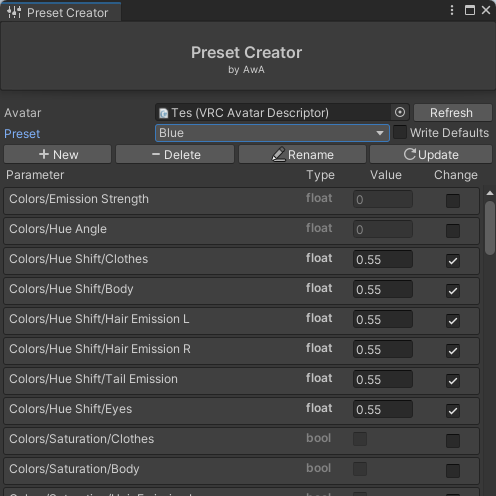
How to use
First time set-up
When first using the tool on an avatar you will be asked to run the first set-up.
This will create a new layer called AwA - Presets - DO NOT TOUCH. Do not delete, or change the name of this layer, this will break the tool.
Creating a new preset
- Click on the
Newbutton - Fill in a fitting name, you can change this later if you have Parameter Renamer installed
- (Optional) You can enable or disable Write Defaults. This doesn’t affect the presets, but will shut up vrcfury and the VRC SDK for having mixed Write Defaults
- Add the new preset
Important
You will need to manually create a menu and assign a toggle to this. For more info see Adding to a menu
Updating a preset
- Select the preset you want to update
- Set the values you want for that preset
Change: Will say if that preset should change that parameter to the specified value, if off the preset will leave that parameter aloneValue: The value the parameter should change to when using the preset
- When you’re done click
Update
Deleting a preset
- Select the preset you want to delete
- Click the
Deletebutton
Warning
This will not touch the menus of the avatar, you will have to delete the presets manually in the menus.
Rename a preset
Important
This requires Parameter Renamer to be installed.
- Select the preset you want to rename
- Give it a new name
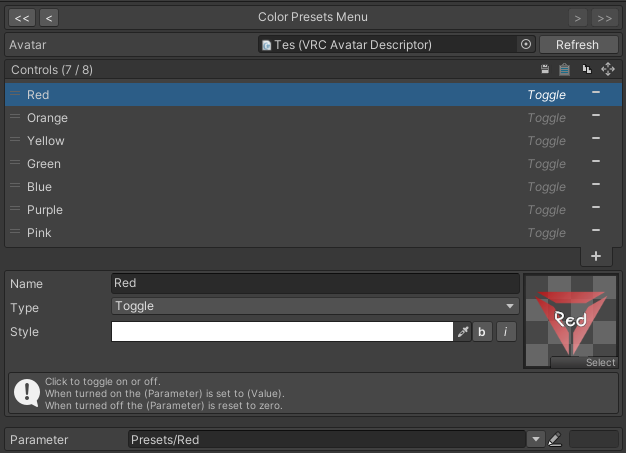
Adding to a menu
- Select or create a new menu
- Create a new Toggle
- Assign the Parameter to the chosen parameter (All presets are in this format
Presets/<preset name>)
Last updated on